
On this page10 min read
At a glance
- Client
- AutoAccru, bookkeeping automation for accounting firms
- CEO
- Kevin Wu
- Location
- Toronto, Ontario
- Stage
- Pre revenue, with its first customers
- Team
- Two in house engineers, no senior technical leader
- Engagement
- Fractional CTO, with extra engineers added sprint by sprint
- What DevToDollars did
- Technical direction, architecture, AI benchmarking, two accounting integrations, a security assessment, team leadership
- Accounting platforms
- QuickBooks Desktop, QuickBooks Online, Xero
3
accounting integrations: QuickBooks Desktop, plus QuickBooks Online and Xero, built by DevToDollars
4
sources matched automatically: receipts, invoices, credit card statements and bank statements
1,000s
of confidential financial rows from client statements and documents
It was an amazing experience working with Amirali. He helped us to build a strong foundation for our application to be ready for scale. While helping us to stay up to date with the latest trends in AI and increasing speed, he also used his extensive software development knowledge to make sure the system is ready for scale.
The challenge AutoAccru had engineers who could build, and a business team that knew what to test. Nobody stood between the two.
AutoAccru automates bookkeeping for accounting firms. When DevToDollars met the company, it was pre revenue, with its first customers, two in house engineers and an architecture left by a previous CTO.
Two teams, little conversation
The business team decided what to build and the engineers built it. Nobody checked a task's effort or running cost, or looked for a simpler version.
Built for later
The previous CTO built for scale before the product had found its customers. The startup needed to ship and test many features quickly.
Platform calls with no owner
Document reading, AI and the accounting integrations all ran on outside platforms. Nobody was choosing them with both the workload and the roadmap in mind.
The engineers also needed someone to turn business goals into technical priorities, day to day. And some sprints needed more hands than the team had.
The first weeks Before changing anything, DevToDollars mapped where the company stood. Then it fixed the one system that mattered most.
The map covered where AutoAccru was and where it wanted to go, in four parts.
The infrastructure
Everything already in place and running.
The product
What the engineers had already built.
The vision
Where the founders wanted the product to go.
The requirements
The business needs behind that vision, such as keeping years of financial history for every client.
From there, the team flagged the one issue that mattered most, given the tools AutoAccru already had, and changed that system first. The map also showed there were no success metrics. With no way to tell whether a change made the AI better or worse, the engineers were building and rebuilding in circles.
The solution A lean platform two engineers could ship on quickly. Built to hold up once the customers arrive.
DevToDollars led the work as AutoAccru's fractional CTO: a part time senior technical leader instead of a full time hire. The aim was a system lean enough to test many features cheaply, and sound enough to keep.
A lean architecture, so every feature could be tested cheaply
On the old DynamoDB setup, separate environments for testing and production made the cost add up. DevToDollars moved AutoAccru to Supabase and used its branching: every feature now gets its own low cost copy of the database to be tested in first.
Search client history by meaning
A vector database makes years of client history searchable by meaning. When a new transaction arrives, the system looks at how that client's similar transactions were handled, and categorizes it the same way.
Queues and rate limits
Customers upload months or years of documents at once. Queues now process them steadily in the background, and rate limits stop any one customer or outside service from bringing the system down.
Success metrics, so the AI stopped going in circles
Experiments found which financial verticals the AI's embeddings, the numeric fingerprints behind search by meaning, should be built around. Then a benchmark pipeline measured the two core AI features: categorization and entity assignment.
Clean the history
An accounting firm's past data, already categorized by its own bookkeepers, was processed and cleaned.
Set the answers
That history became the benchmark: the correct answer for every transaction.
Score the system
The same statements ran through AutoAccru, and its categories were compared with the benchmark.
For the first time, every change could be judged against a number instead of a feeling, and the team stopped going in circles.
A roadmap first, then QuickBooks Online and Xero
AutoAccru had one integration, QuickBooks Desktop, and wanted to reach firms that work in QuickBooks Online and Xero. The team did not know those platforms' data models, and its own system lacked some it would need.
DevToDollars mapped each platform against AutoAccru's system and wrote a roadmap: how to build each integration, what had to change, and how to shape the database so later integrations need no rebuild. Then it built both.
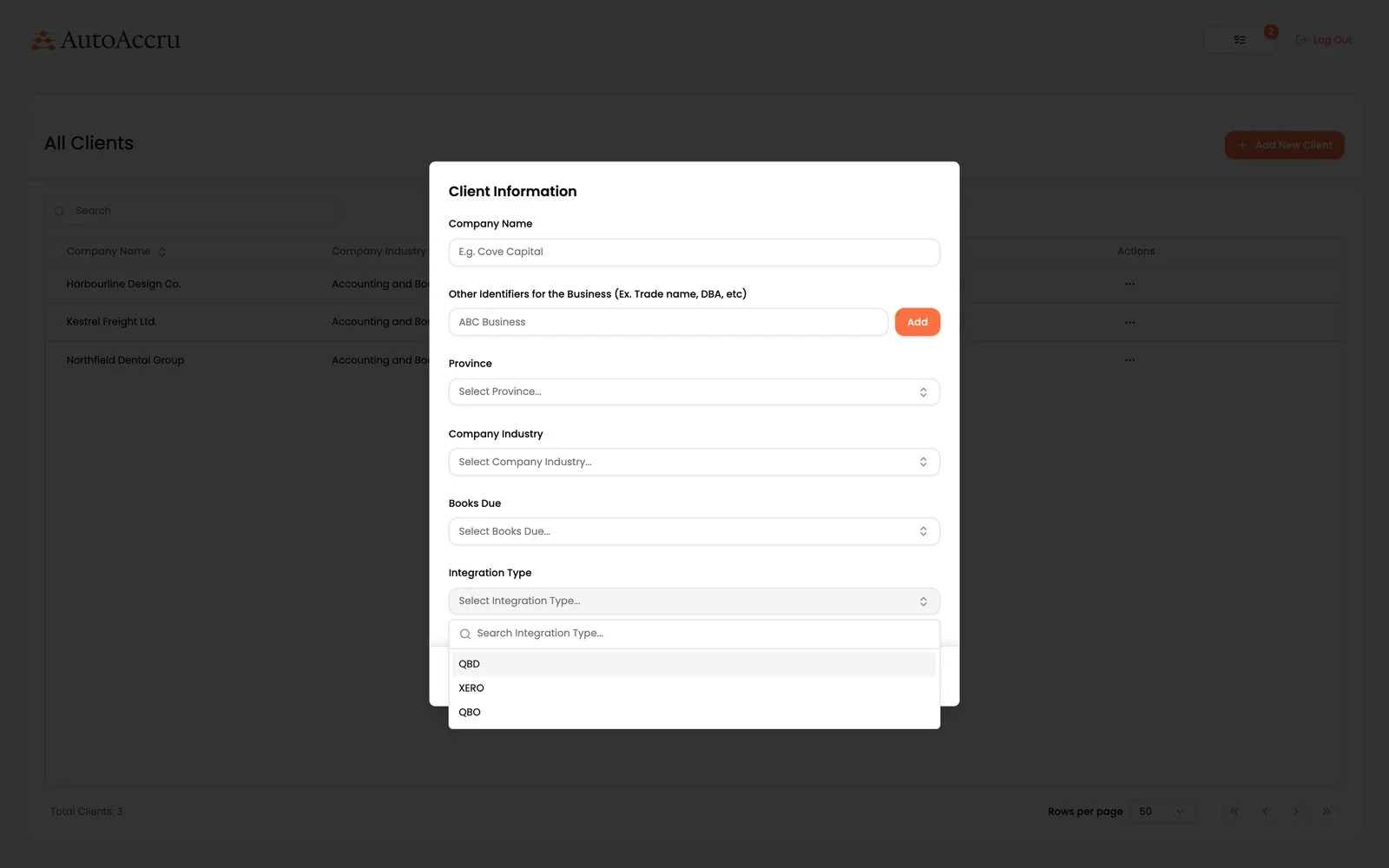
Adding a client
Pick the platform
The firm chooses QuickBooks Desktop, Xero or QuickBooks Online. The cloud platforms connect through OAuth, a secure sign in that never shares a password.
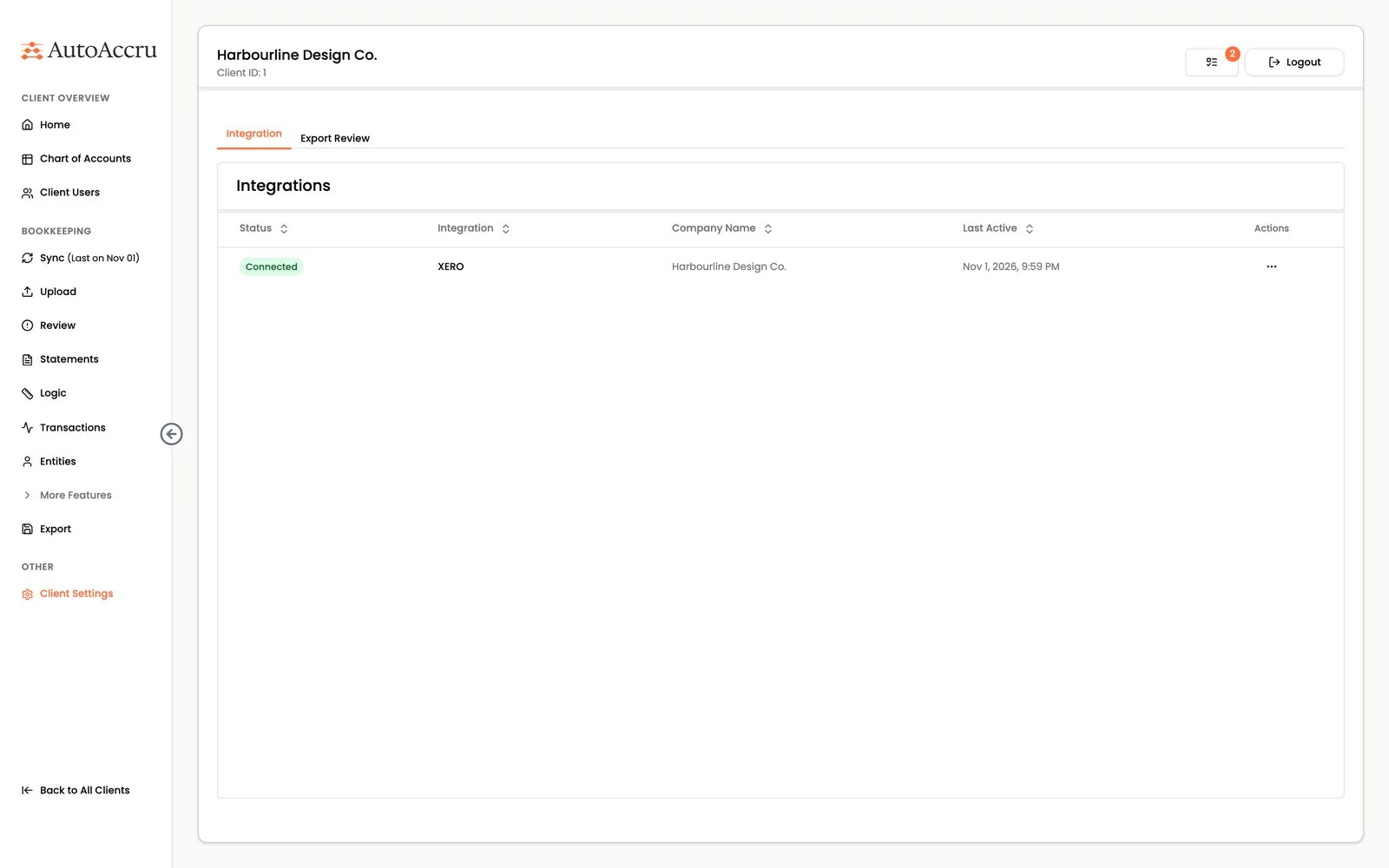
Connecting
Link the account
The client's Xero organisation is linked, with the time of its last sync. QuickBooks Online works the same way.
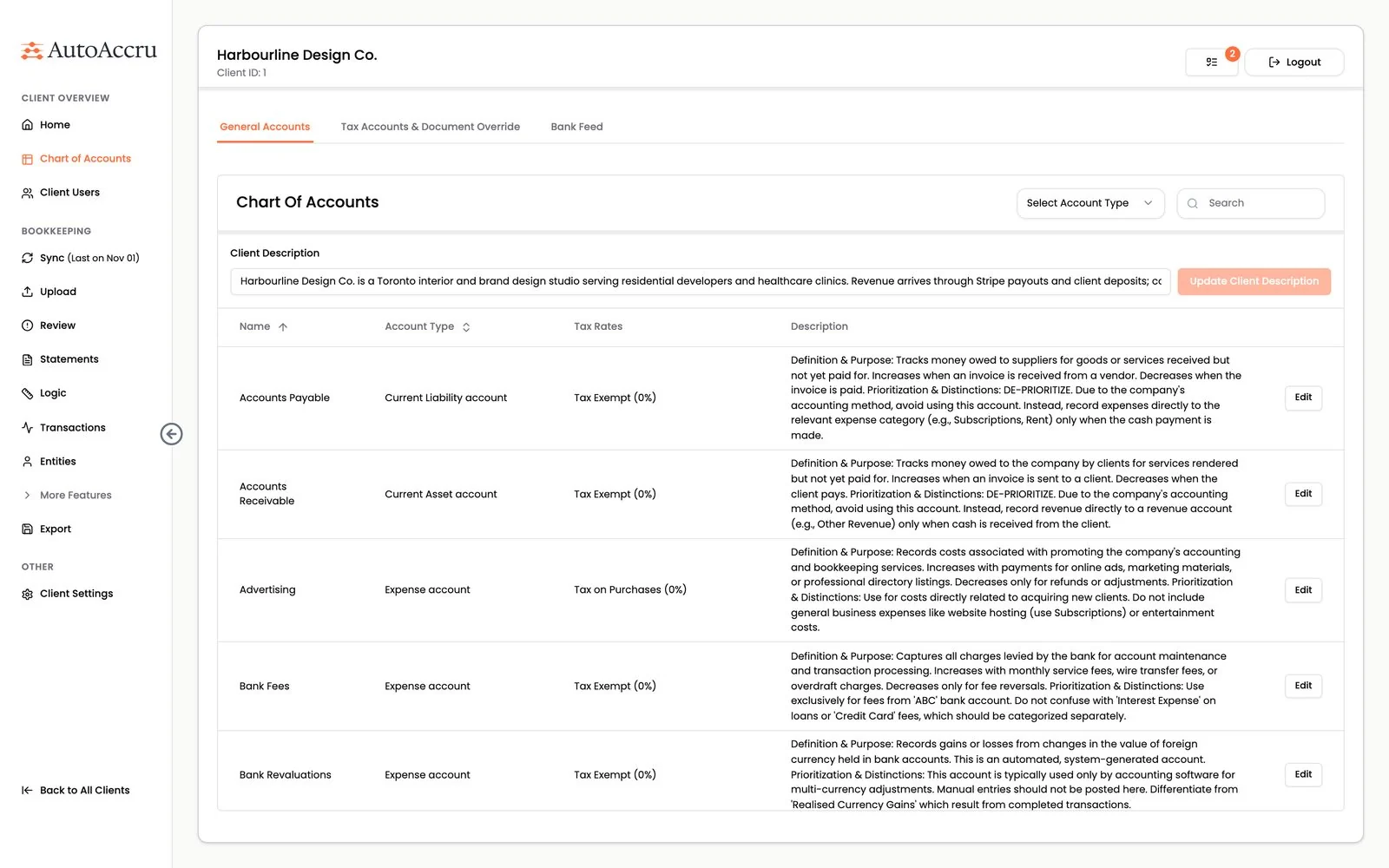
Setting up
Bring in the chart of accounts
Accounts, types and tax rates come in from Xero. Each account gets an AI written description of what belongs in it, which later guides categorization.
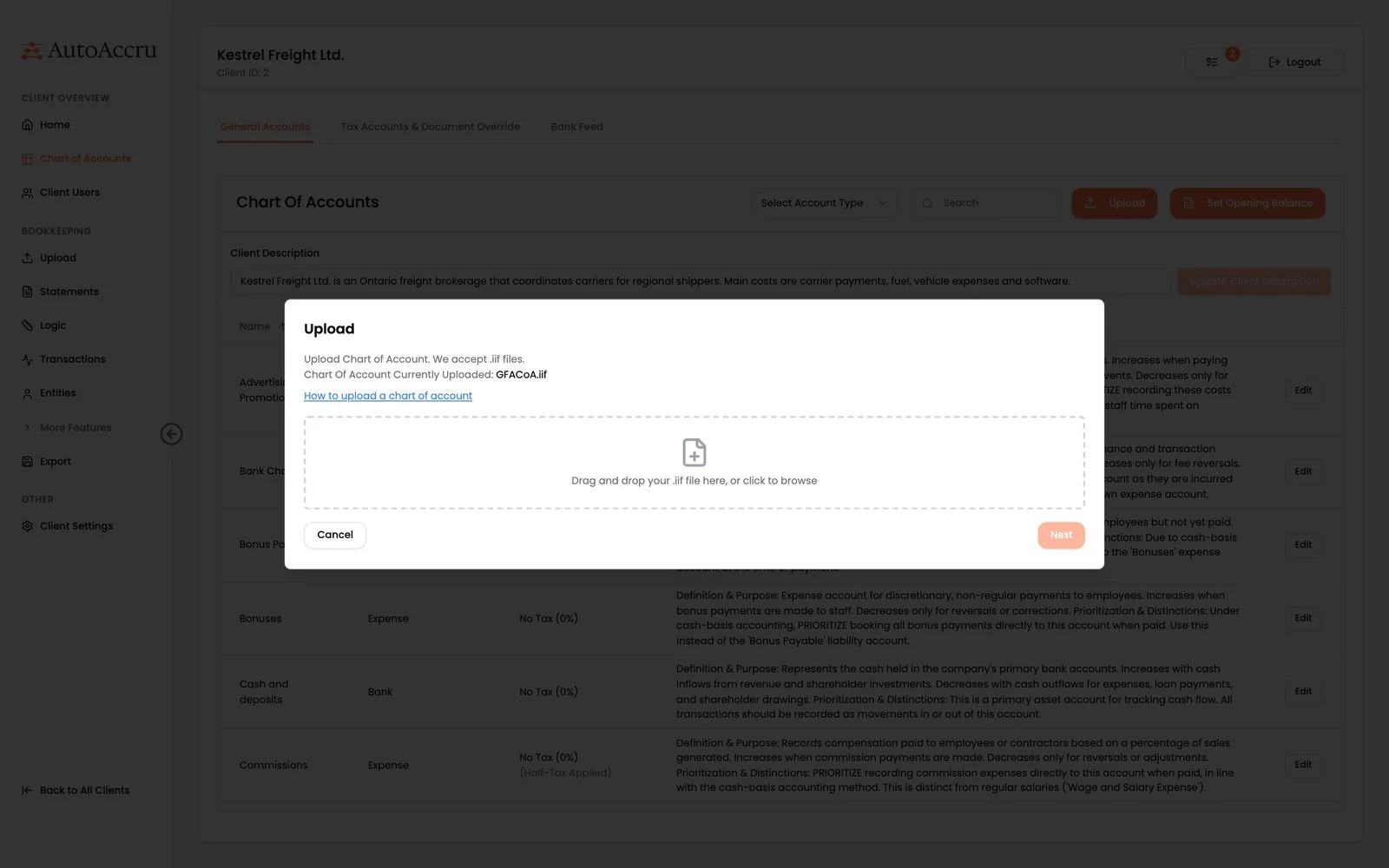
QuickBooks Desktop
Upload a file instead
QuickBooks Desktop has no cloud API, so its chart of accounts arrives as an exported .iif file.
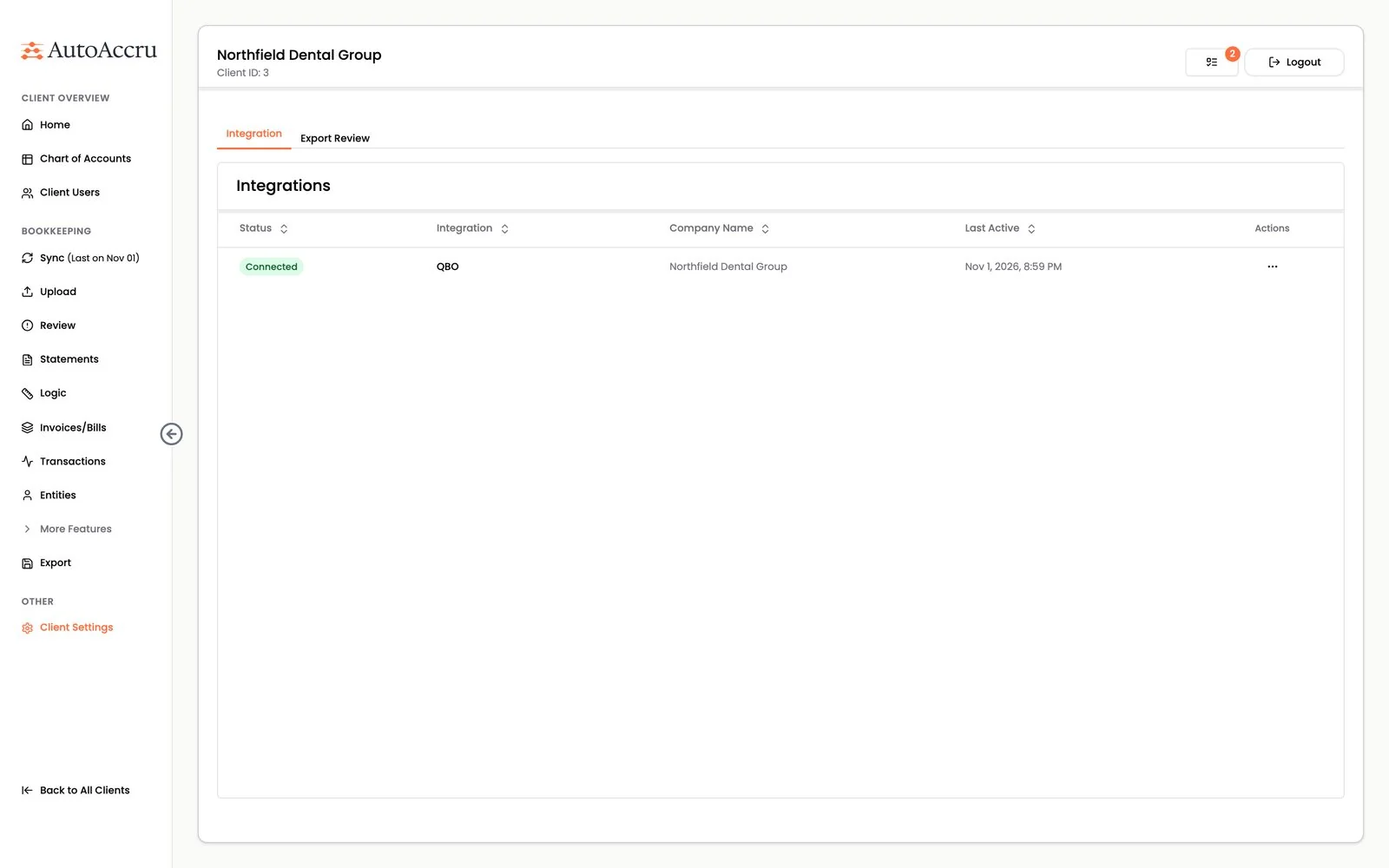
QuickBooks Online, connected for another client.
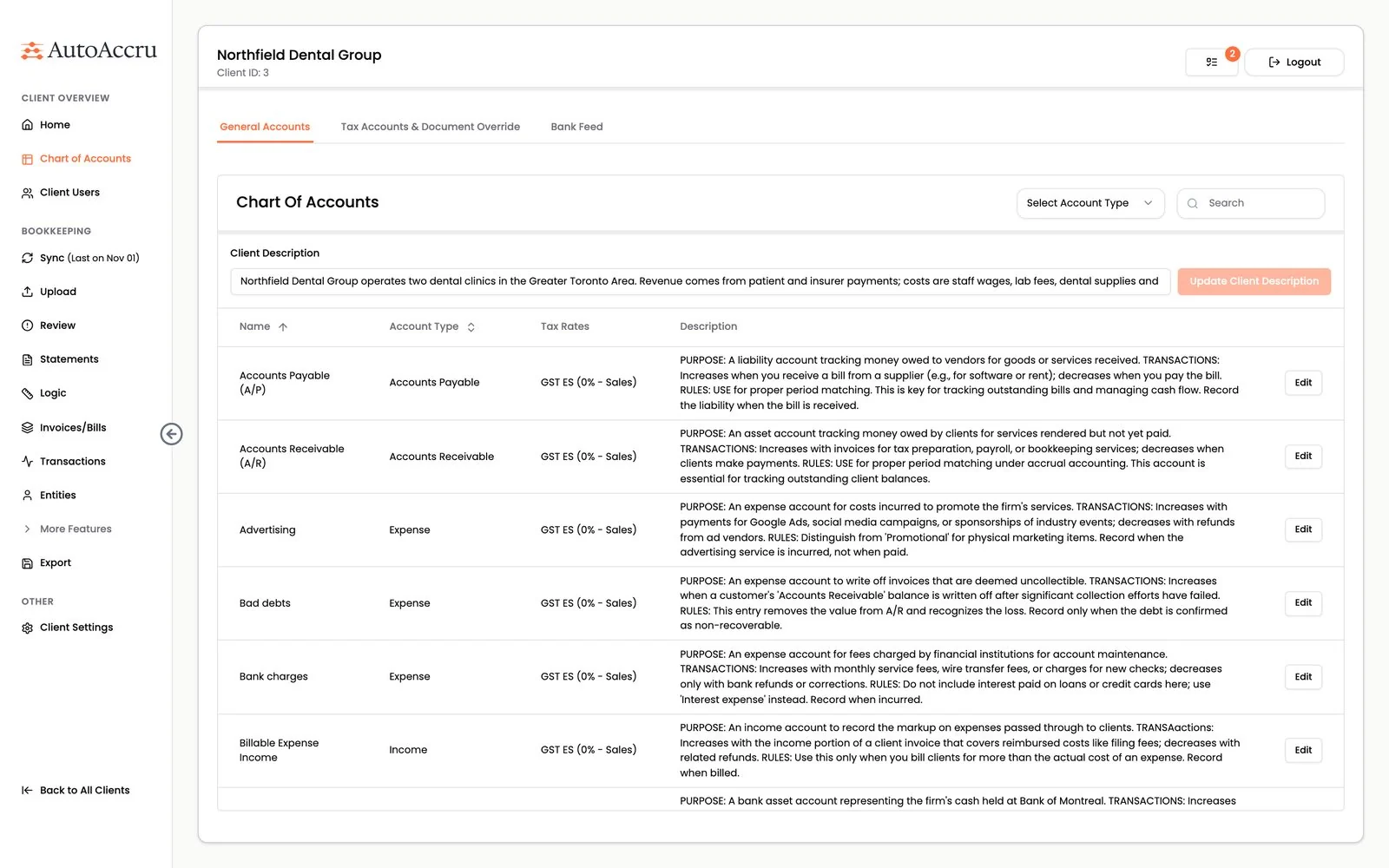
The QuickBooks Online chart of accounts, with its own tax codes.
Leading the team, so two engineers could move fast
DevToDollars brought in lean sprint planning: the business team set the tasks and their priority, and the engineers took them in that order. Not a corporate process, just enough to keep everyone coordinated.
No overlap
Each engineer owned a clear piece of the work. Nobody blocked anyone else, and nothing was built twice.
Retrospectives
A regular, open place to say what was working and what was not, before small frictions grew.
Postmortems
When something went wrong, the team worked out why and what to change, so the same mistake was not made twice.
When a sprint needed more hands, DevToDollars added engineers from its own team, so AutoAccru got capacity exactly when needed without hiring before it was ready.
Confidential financial data Bank statements, receipts and ledgers are as sensitive as data gets. So every layer was assessed, then locked down.
AutoAccru holds this data for accounting firms and their clients. DevToDollars ran a complete security assessment, then wrote a roadmap for adding each security measure.
Closed gateways
Document processing, categorization and the integrations run on AWS Lambda behind API gateways, which now answer only to the application itself.
A tenant on every row
Every firm and every client is a separate tenant, enforced on each row of the database, not only in the application code.
Row level security
A user can read only their own firm's and clients' rows, and nothing can be reached from outside the application.
Guards against prompt injection
Any uploaded document could hide instructions meant to manipulate the AI model. Text in a document is treated as data, never as instructions, so a malicious file cannot change how transactions are categorized.
The product Statements go in and a finished ledger comes out. In between, the app reads, categorizes and matches every transaction.
A bookkeeper uploads statements, checks what AutoAccru has read and sorted, and sends the ledger back to the firm's accounting platform.
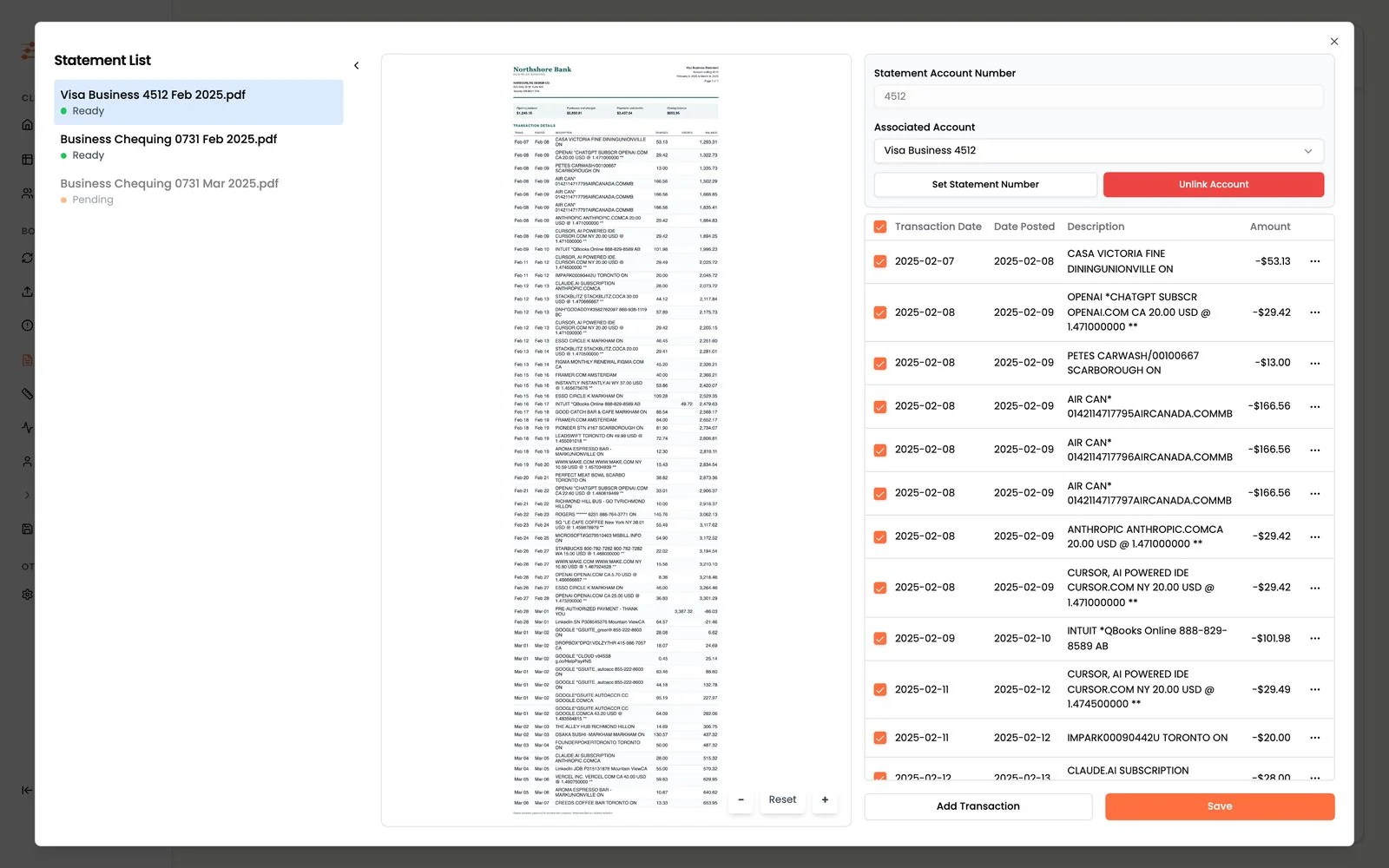
Upload
Statements wait for review
Each PDF is read automatically: the bank, account number, statement period and linked ledger account are detected.
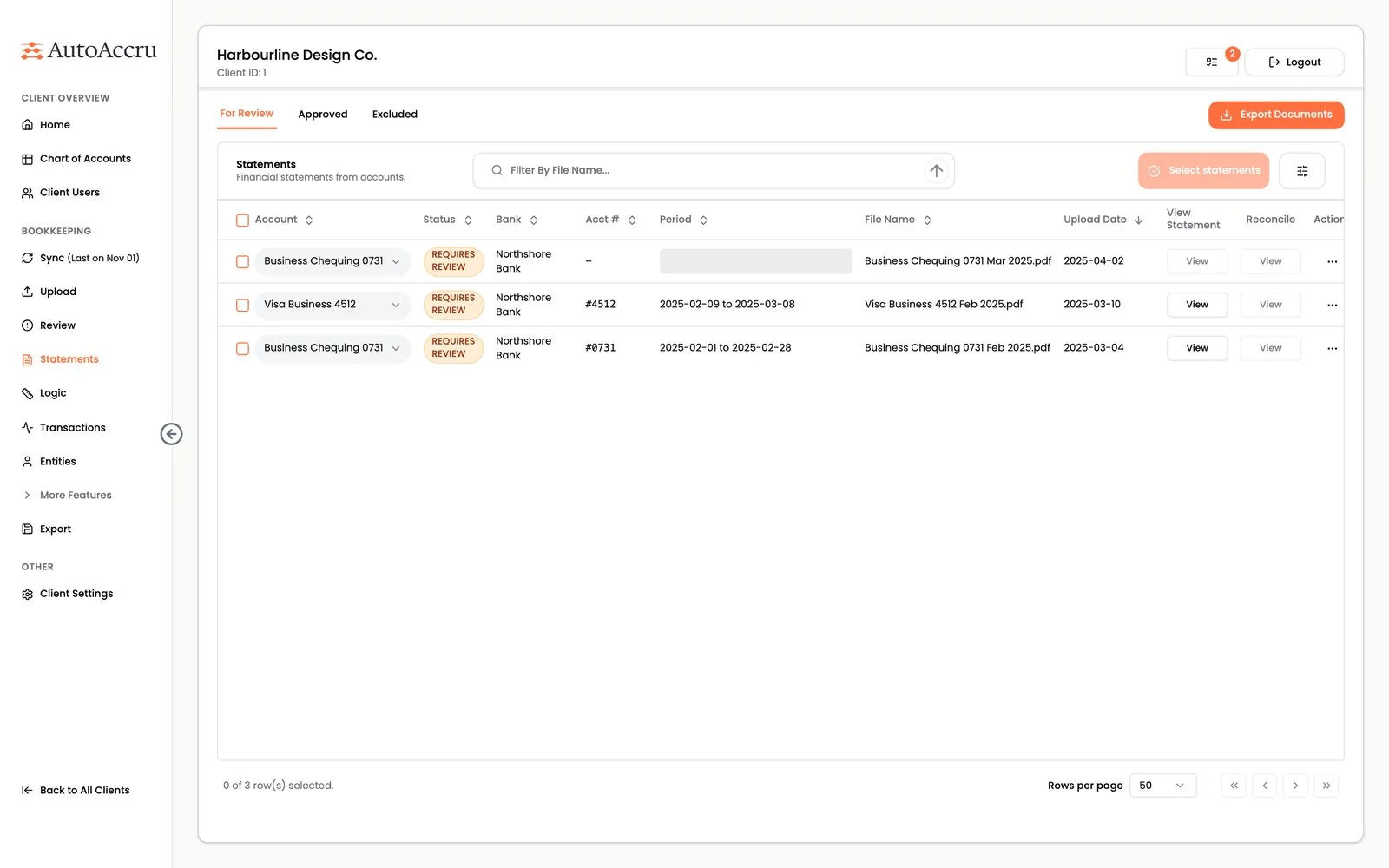
Read
Every row pulled from the page
The statement sits beside its transactions. The bookkeeper can fix a row, add one or untick rows before submitting.
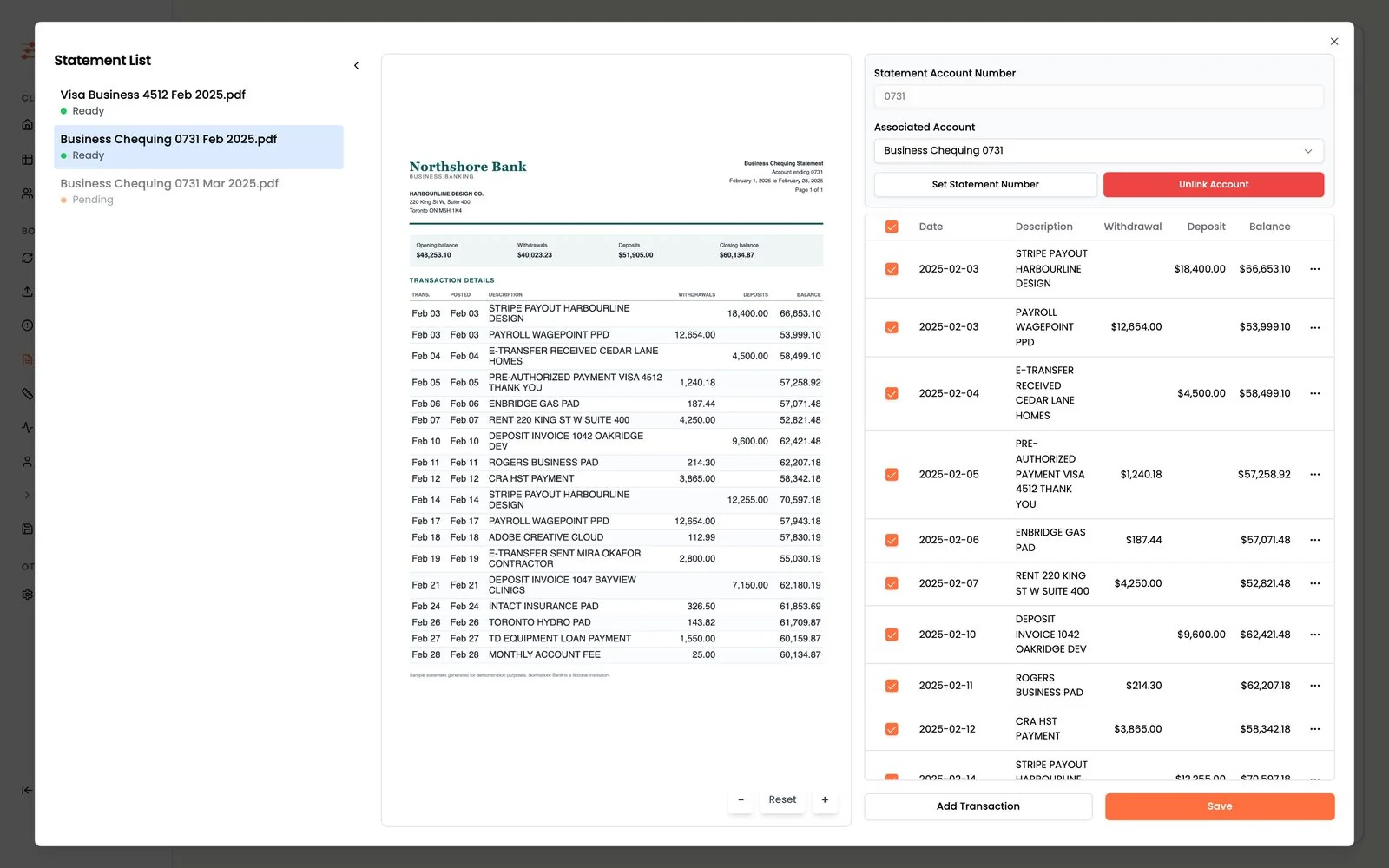
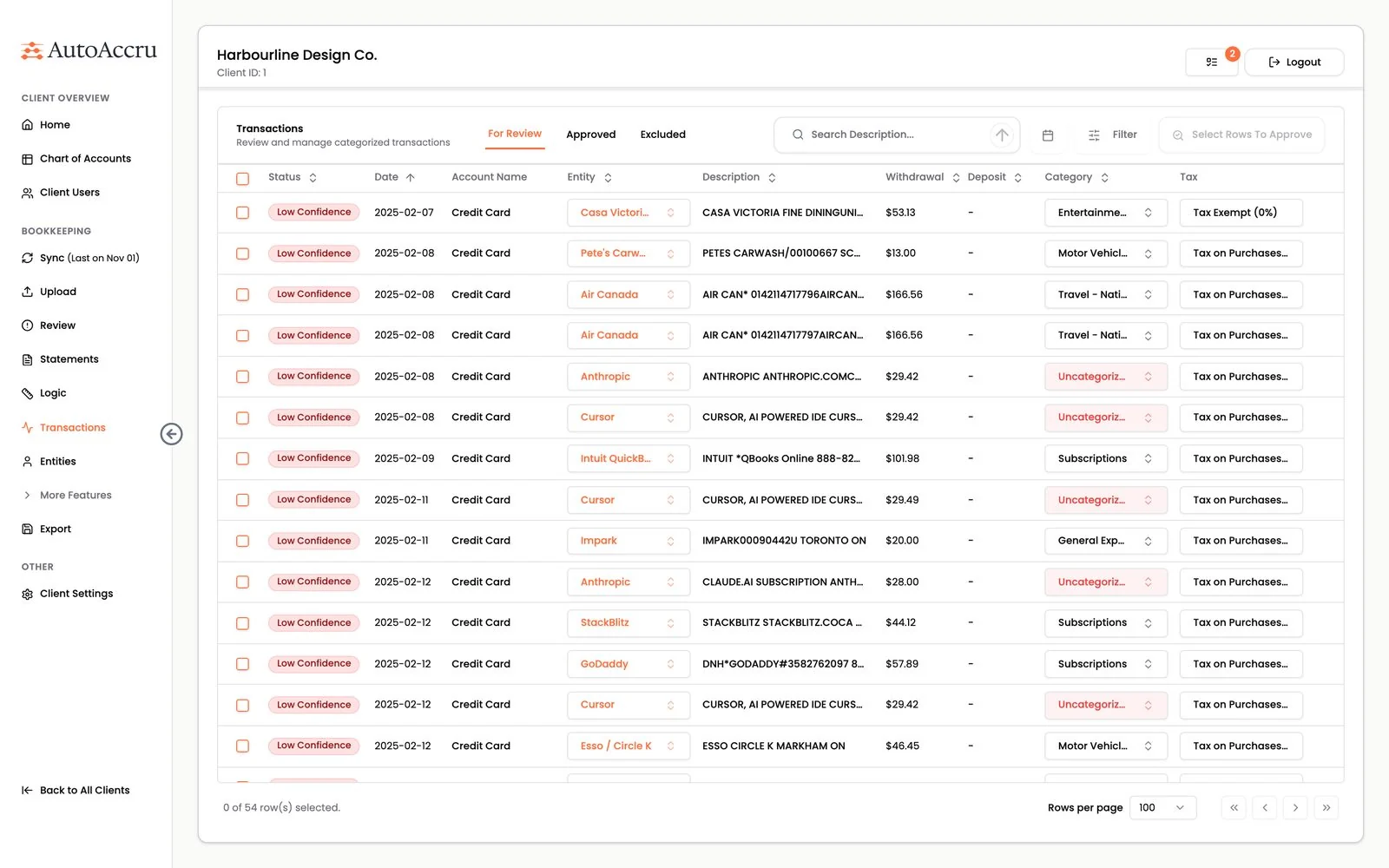
Categorize
A category for every transaction
Each one arrives with an entity, a ledger category and a tax code filled in. Rows the system is unsure about are flagged for review.
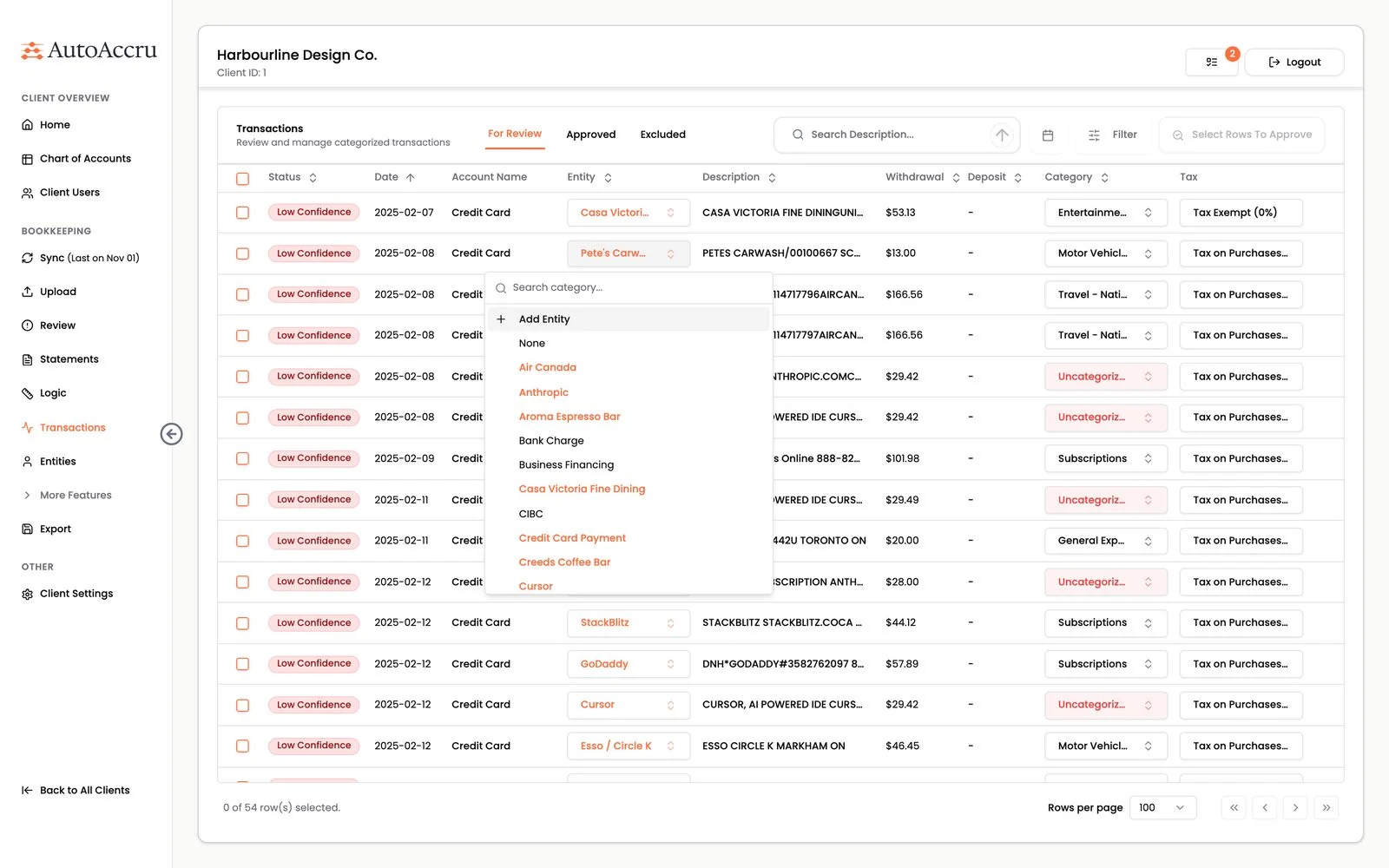
Assign
The right vendor, customer or employee
Raw bank descriptions are matched to a clean entity, and a new one can be created on the spot.
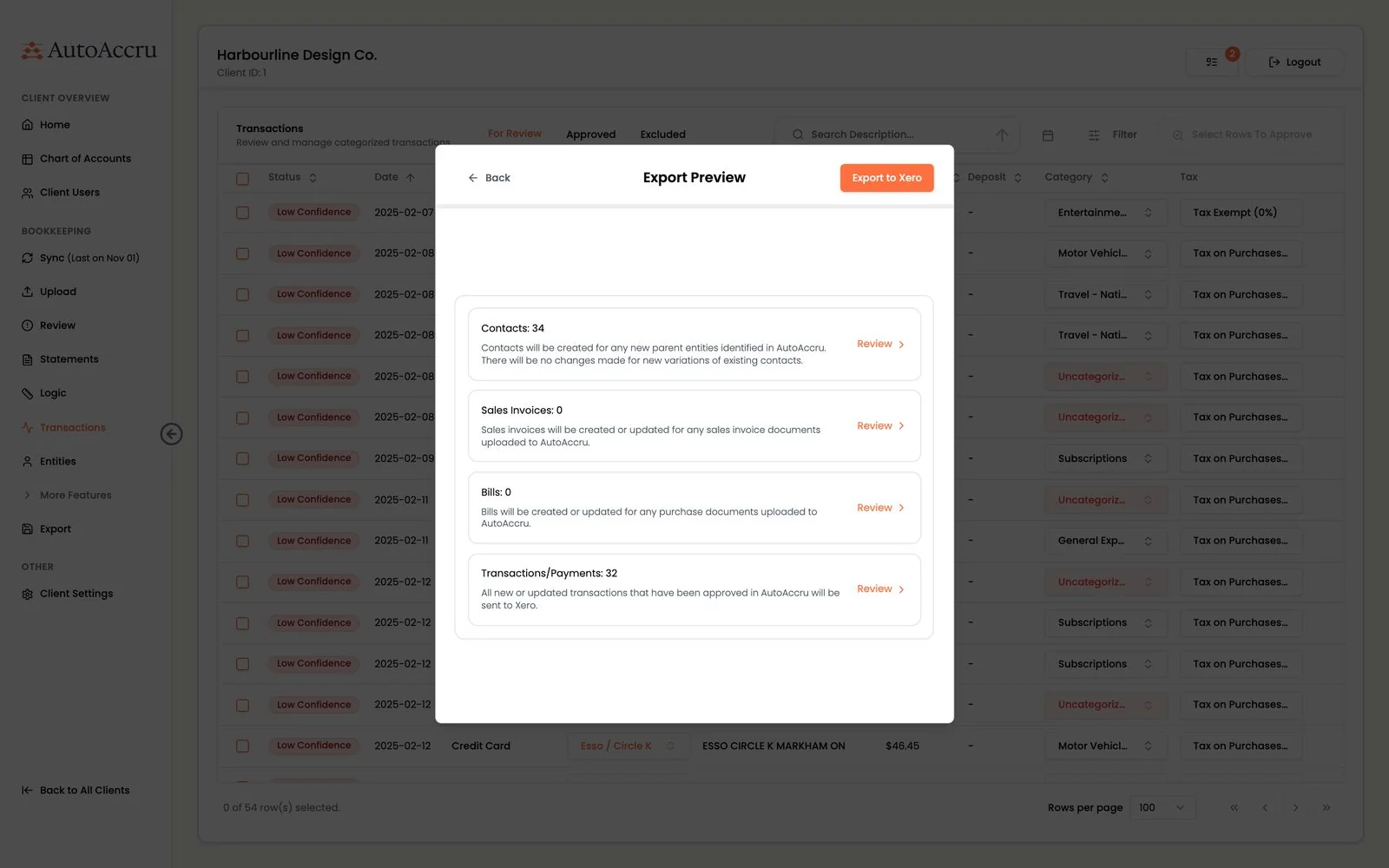
Export
A preview before anything is sent
The export lists how many contacts, invoices, bills and transactions will be created in Xero.
Credit cards too. The same flow for a credit card statement.
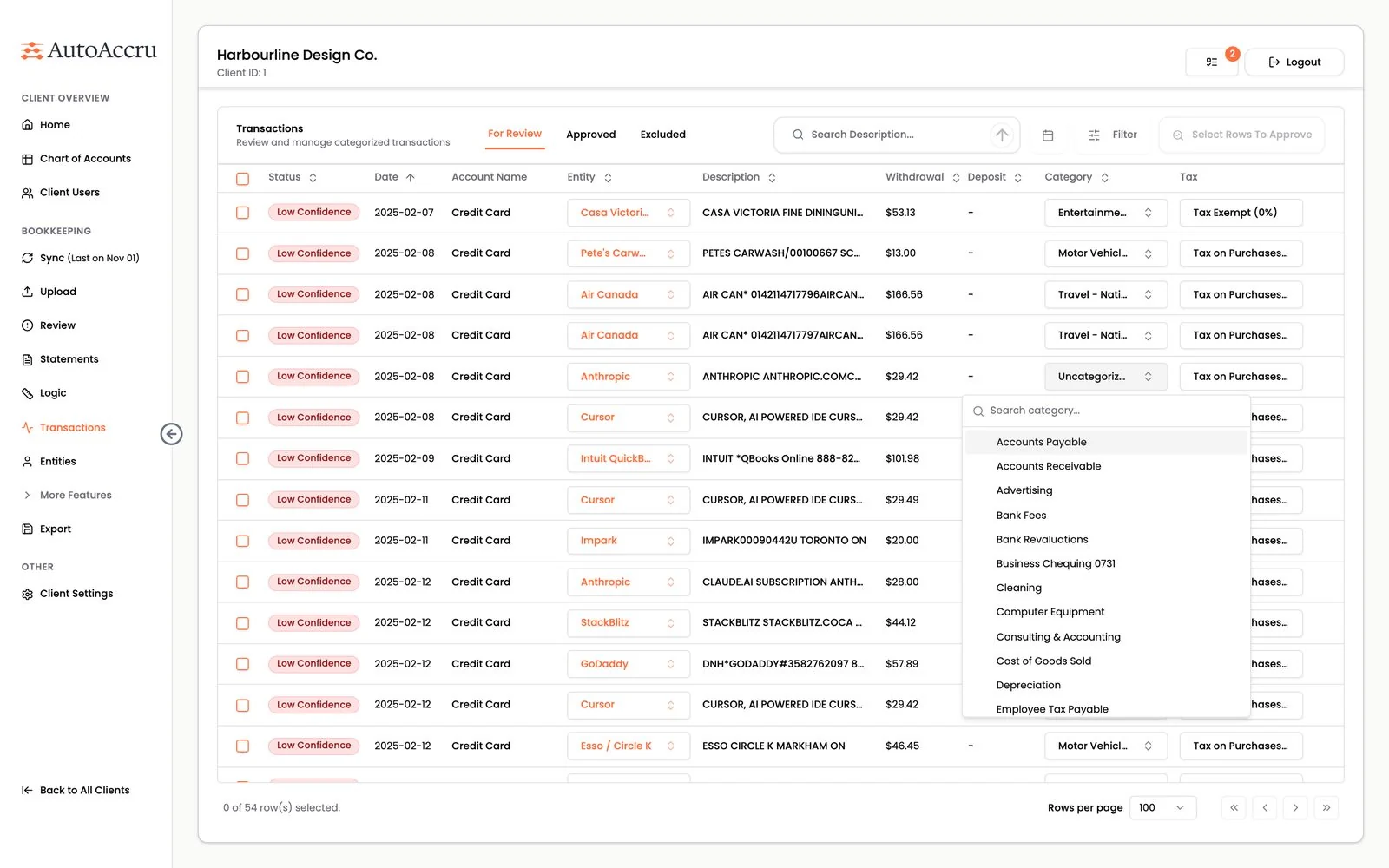
One click corrections. The picker lists the client's own chart of accounts.
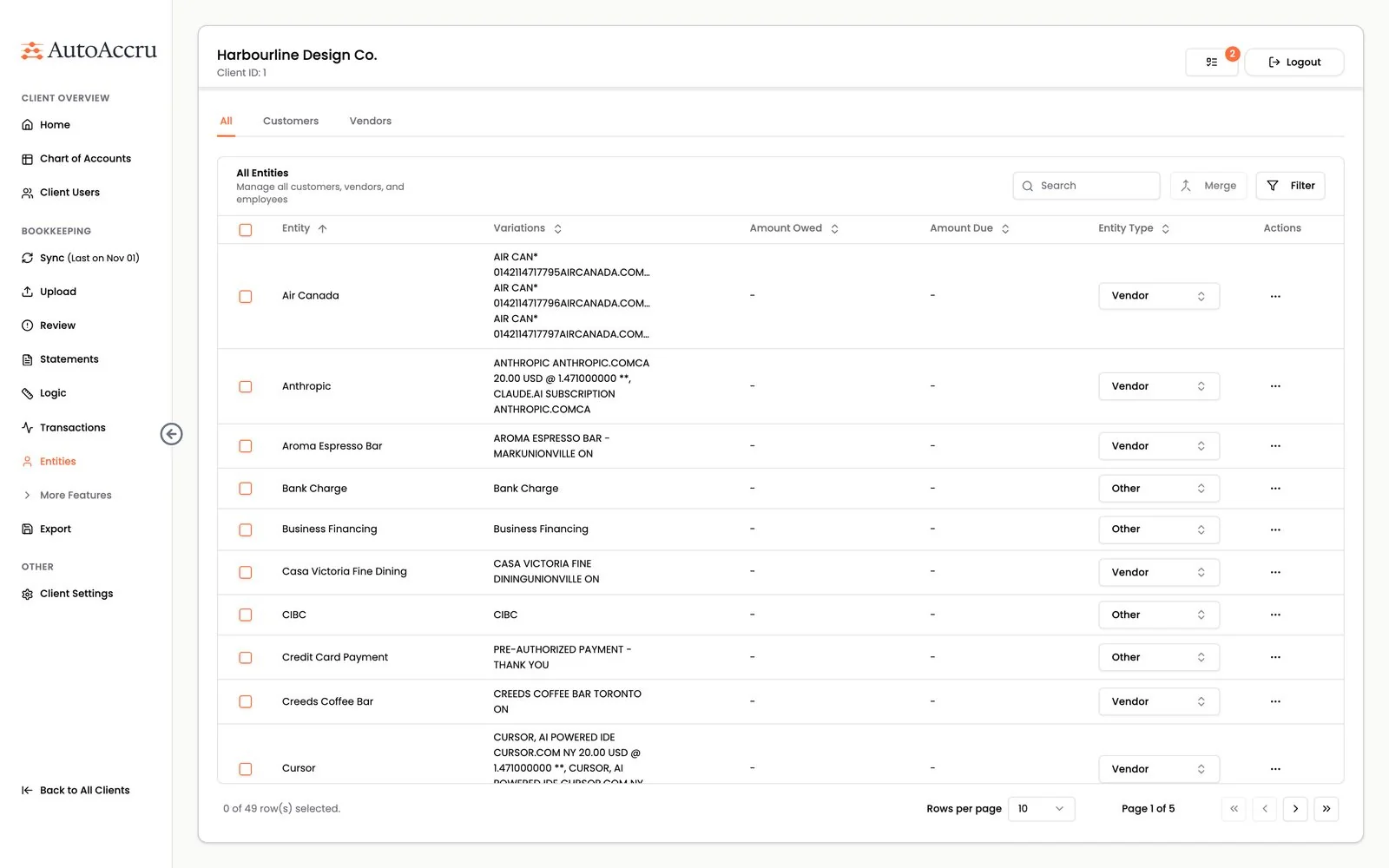
One entity, many spellings. Three Air Canada descriptions, collected under one vendor.
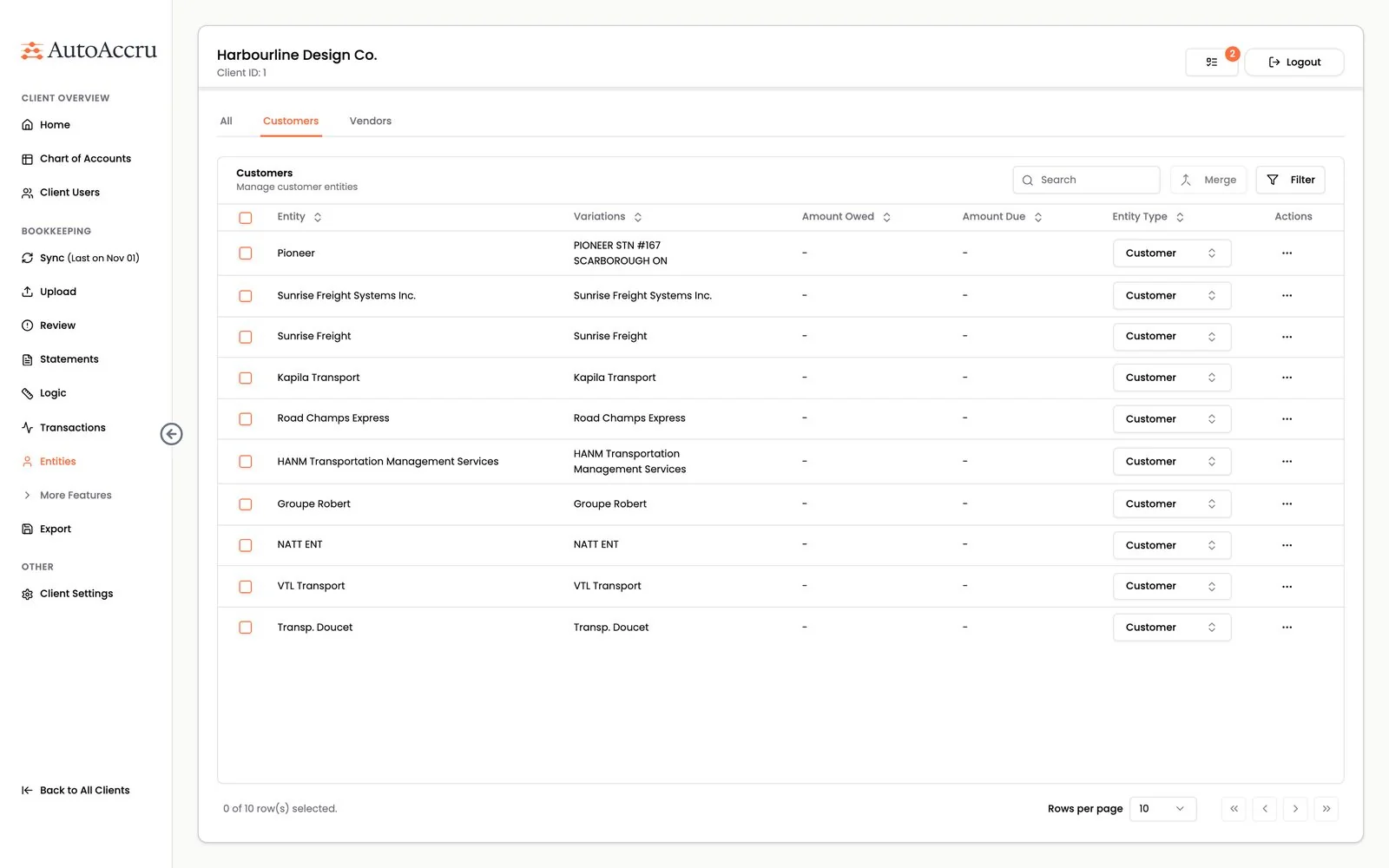
Customers, vendors, employees. The type decides how each entity is exported.
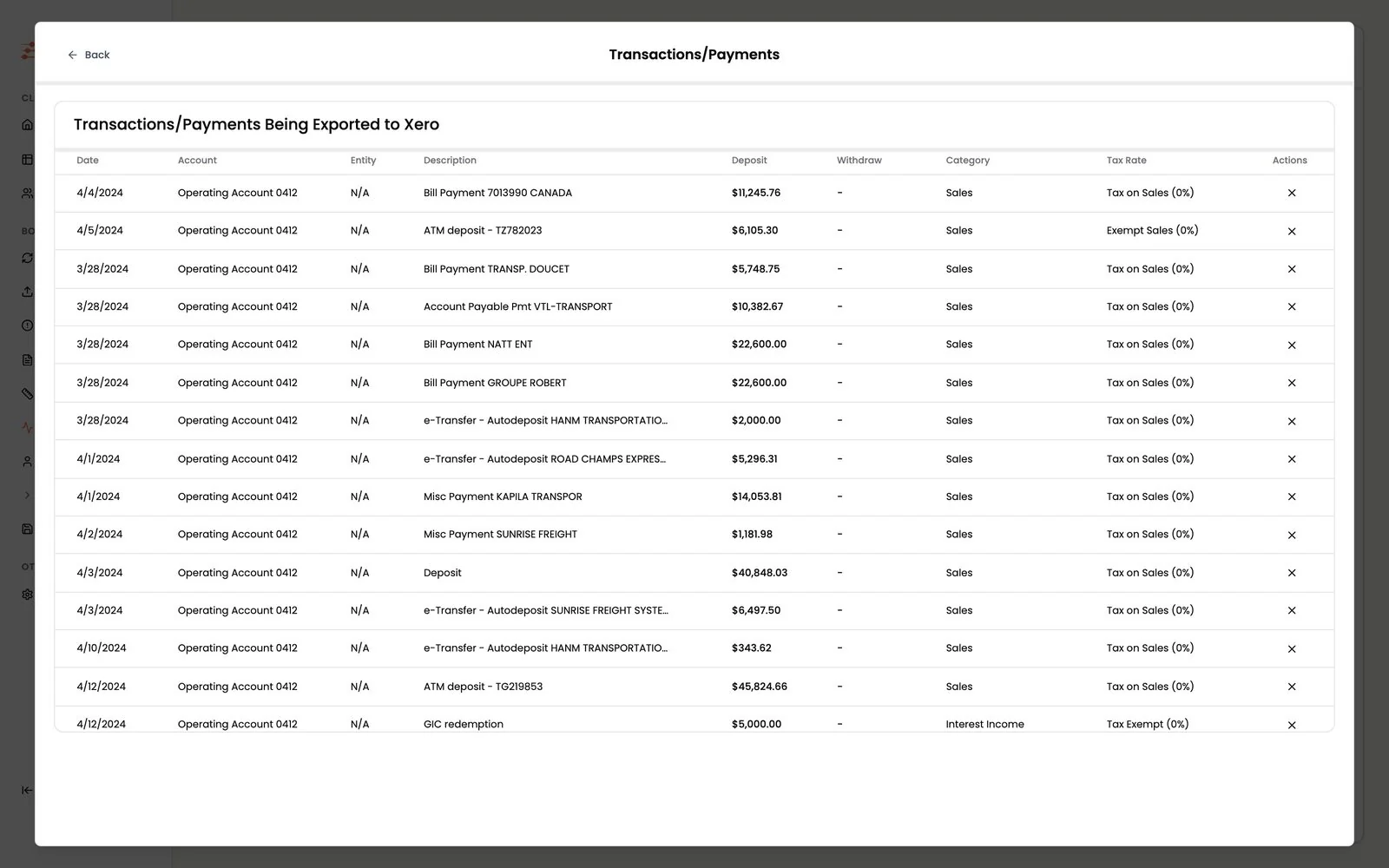
Bound for Xero. The exact rows, with category and tax rate, that will be written.
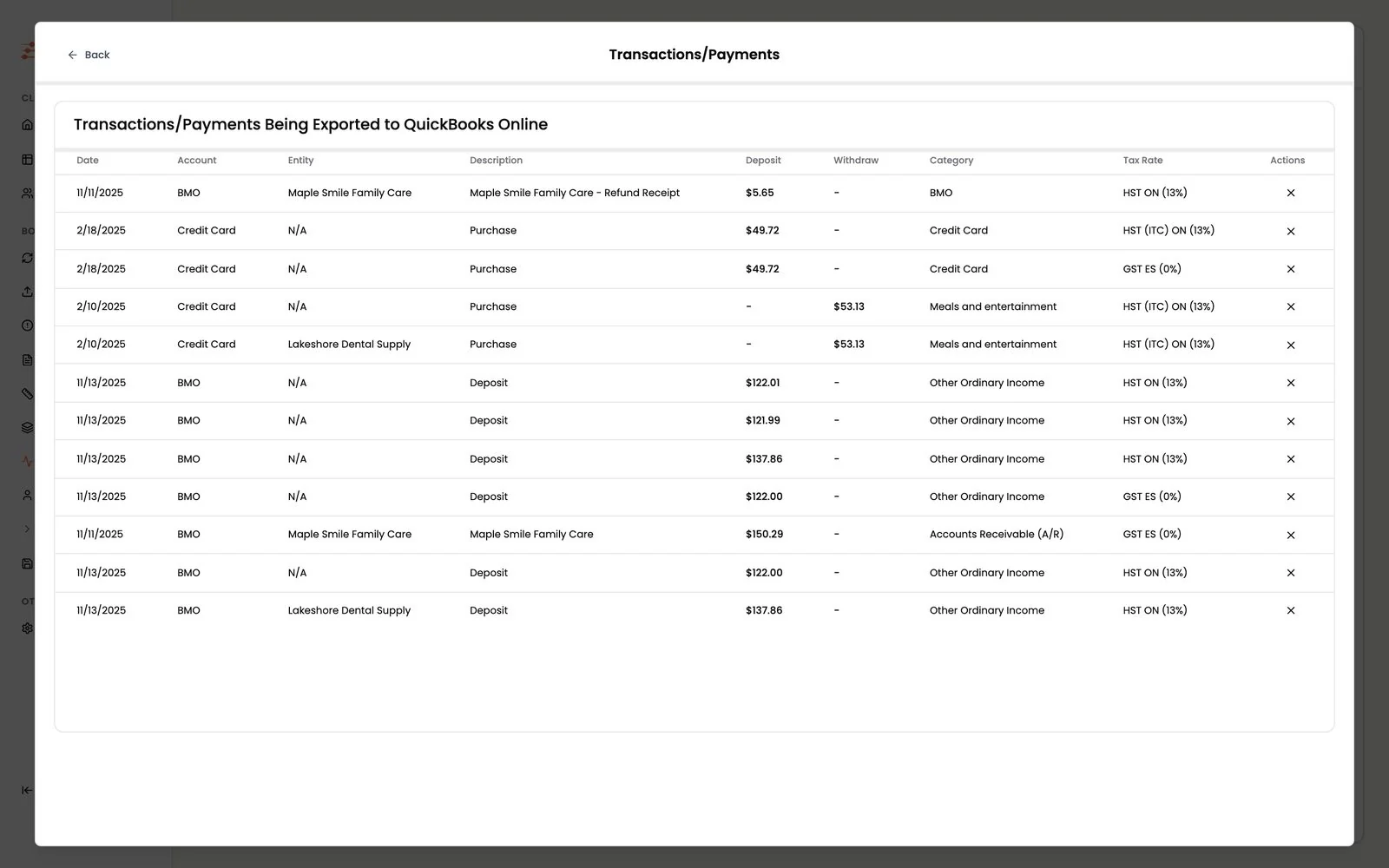
Bound for QuickBooks Online. The same preview.
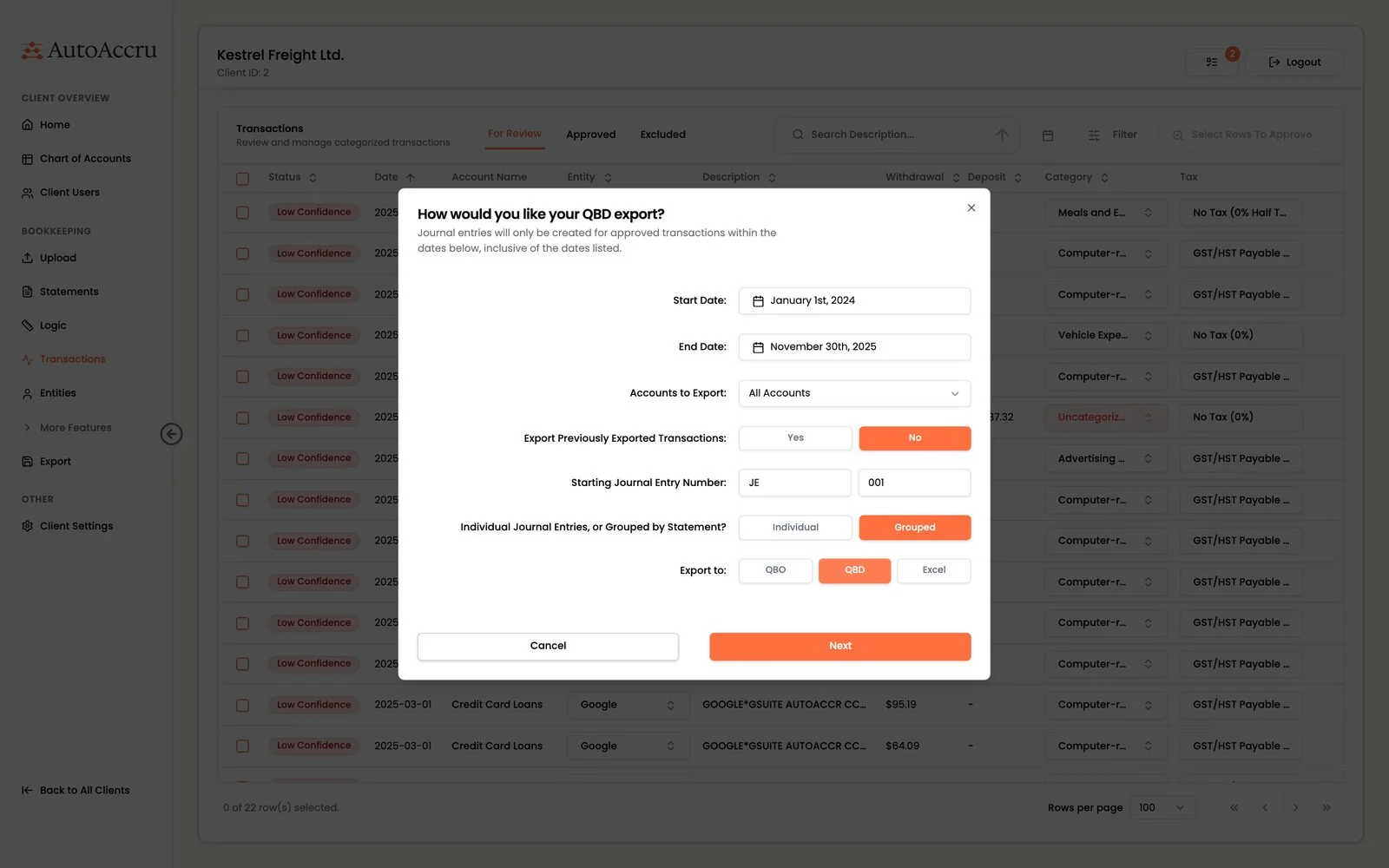
QuickBooks Desktop. Pick dates, numbering and grouping, then download a file to import.
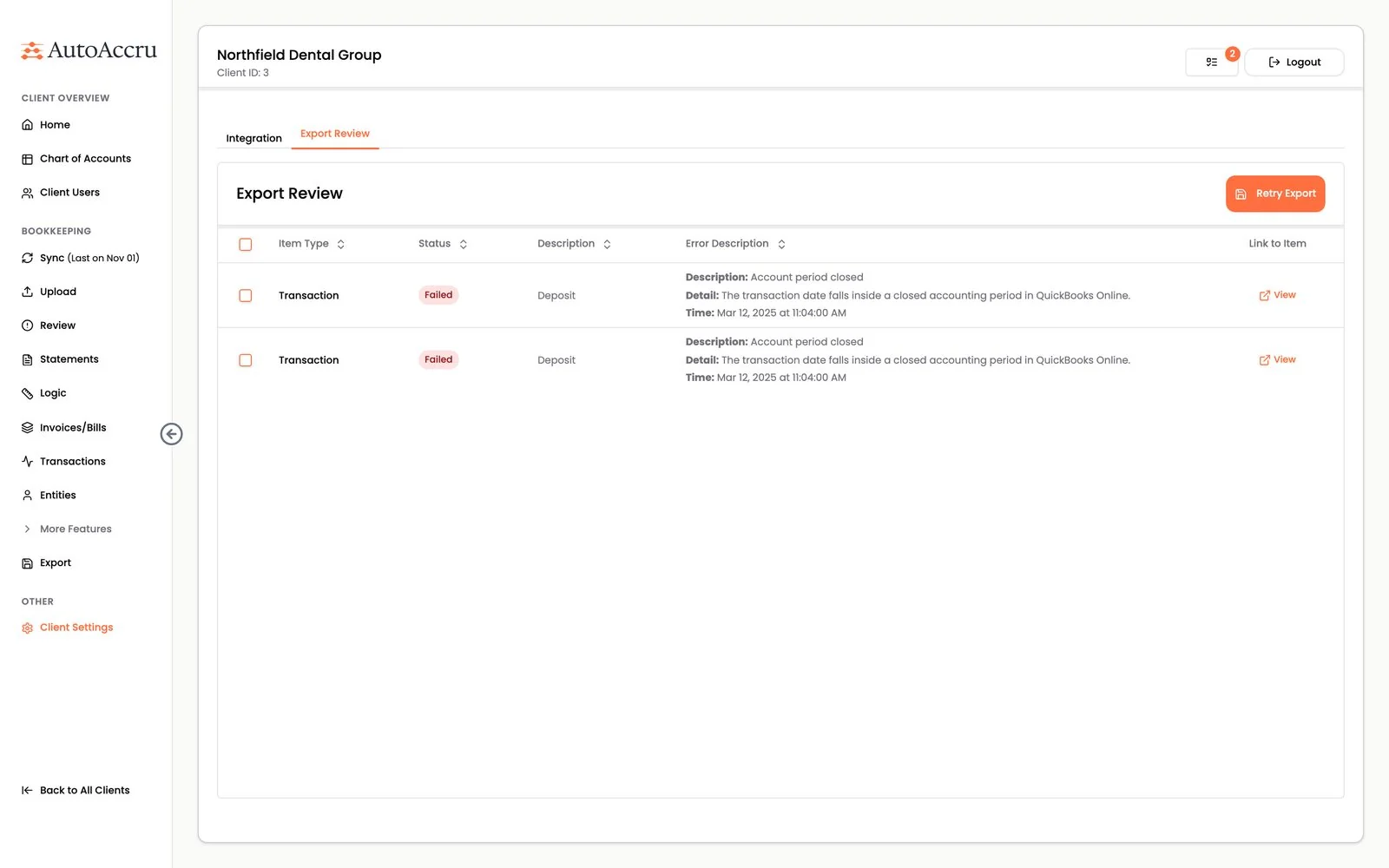
Export review. Rejected rows, here for a closed period, are listed with the reason and can be retried.
Where it fits Engineers with nobody leading them is a common place for a startup to be. It is also a fixable one.
Before
- Two sides apart: the business decided, the engineers built what they thought was needed
- A heavy architecture: built for scale before the customers came
- No metrics: every change to the AI judged by feel
After
- Lean sprints: business priorities, worked in order
- A lean platform: a low cost test branch for every feature
- A benchmark: every change to the AI judged against a number
AutoAccru had the profile a fractional CTO suits best: first customers, engineers of its own, and a previous CTO whose architecture was too heavy for its stage. If that sounds like your company, CTO consulting may fit better than another full time hire. In Toronto, the DevToDollars team works in person, not only on calls.